Multirooms: tailor-made music for every room
- Demo at your location
- Package with a free music computer
- Guaranteed lowest price
- 24/7 support
Create multiple musical spaces with Multirooms
By simply connecting an extra sound card to your computer, you can enjoy the versatile multiroom system. It gives you the option of filling different rooms with different music styles. While the latest top 40 hits play in the bar, calm background music sounds in the restaurant. Each sound card can serve up to 5 separate rooms. The system integrates seamlessly with the Remote and Request apps for an optimal experience.
With Backsound Multirooms you effortlessly create multiple musical spaces. Multiple zones are available free of charge as standard. Want to work with more than two zones? Then you need one extra sound card, which gives you 5 zones in total. The monthly price stays the same; you only pay for a one-off purchase of the sound card, usually around €170.
Request a demo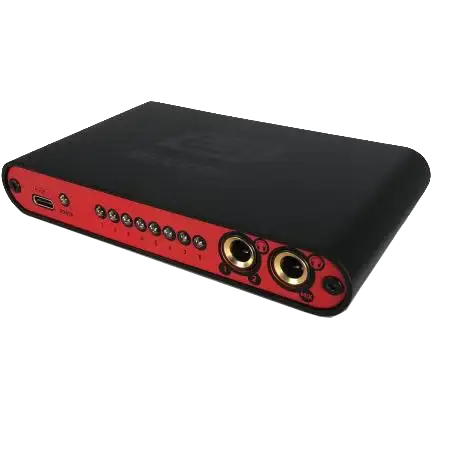
Benefits of Multiroom
- Flexible – decide for yourself which music plays in which room
- Easy to operate – via smartphone or touchscreen
- Scalable – add extra zones effortlessly
- No extra subscription costs – even with multiple rooms
- Tailor-made experience – create the right atmosphere for each zone
Multiroom applications
- A restaurant with calm lounge music and atmospheric dinner tracks in the dining area.
- A gym with energetic music in the fitness area and relaxed music in the yoga studio.
- A shop where every department has its own atmosphere.
Versatile platform
BACKSOUND FEATURES


Music enhances the experience
Music plays a crucial role in the atmosphere and experience of your space. It influences your customers’ mood and contributes to a positive experience. Whether it is relaxed background music or energetic tracks, the right music makes the difference. With Backsound you choose a carefully tuned music selection that perfectly matches your brand and target audience.
Request a demo

Create and manage your own playlists, wherever you are
With Backsound you easily put together your own playlists – whether you are at your PC, on the go or simply relaxing on the sofa with your phone. Log in to your personal Backsound customer page and add tracks or ready-made playlists with one click.
The powerful ImportMusic Tool lets you not only import your own Spotify playlists, but also search for and adopt public playlists from others. That way you always have access to an endless music library that you can use straight away in your business.
As soon as you save a playlist, it is automatically synchronised with your music computer, ready to be played straight away.
Perfect for:
- Parties and events: always the right music for every moment
- Ease of use: create or import playlists even from the sofa on your phone
- Customer experience: let customers choose their own or public playlists
- Worldwide use: log in from anywhere in the world to manage your music

Frequently asked questions about multiroom
Can I play different music in different rooms?
Yes, multiroom lets you set your own music for each room and manage it centrally.
How do I configure music for different rooms?
In the Backsound dashboard you decide which playlists play in which rooms.
Do I need multiple subscriptions for multiroom?
No, you have one Backsound subscription; you simply configure multiple zones within it.
Can I control all rooms at once from any device?
Yes, via the Remote App or the dashboard you can control all rooms at once or separately.
Is multiroom suitable for large companies?
Yes, multiroom is designed for businesses of every size, from office buildings to large retail locations.